
Symplectic Publications
Role: All editing roles
The Symplectic Publications component draws publicly available publications metadata from Symplectic Elements and outputs these results in a pre-set listing style. Configure display options for number of items on the page, to show/hide filters, show/hide pagination, and link to a full listing.
How to edit
Getting started
- Add your preferred section layout
- Symplectic can now be added to Tabs
- Click 'Add component in this column'
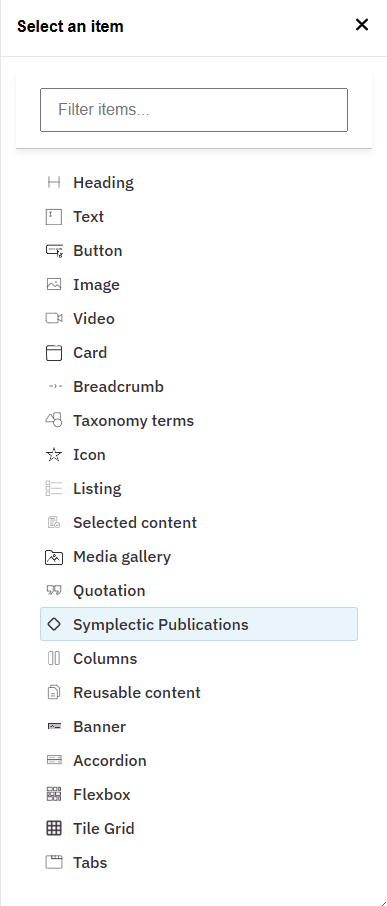
- Select 'Symplectic Publications' (Fig. 1)
Content Settings
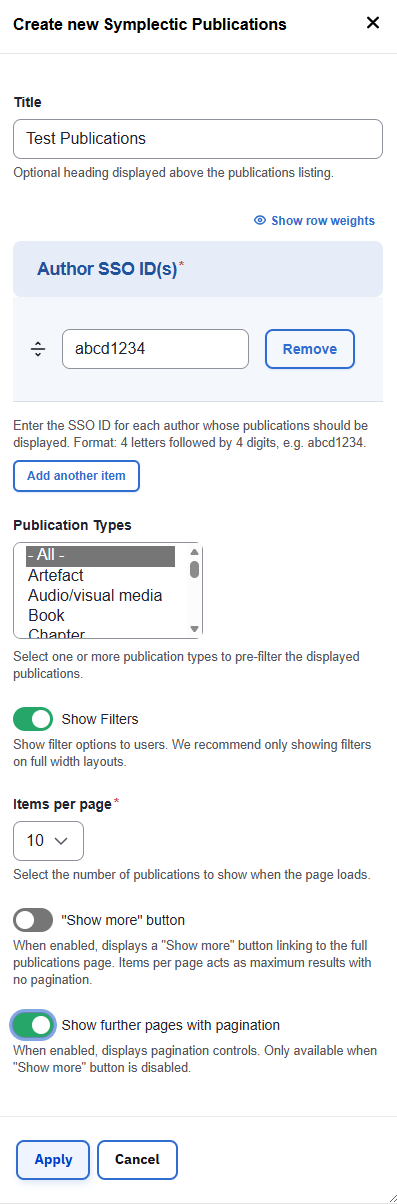
- Optionally add a title for the listing (Fig. 2)
- Paste the author SSO ID(s) into the input field for each author whose publications should be displayed. Format: 4 letters followed by 4 digits, e.g. abcd1234
- Optionally select one or more publication types to pre-filter the displayed publications or leave to display All
Display Configuration
- Decide what kind of list to display:
- A full-list (if total items is less than 50) with pagination to move through the items
- A brief list with a 'Show More' button which links to a full-page list of publications
- Optionally toggle 'Show Filters' to expose filter options to end-users
- We recommend only showing filters on full width layouts
- Choose how many publications to show when the page loads (from 5 to 50)
- Optionally toggle the 'Show more' button
- 'Items per page' defines the maximum results shown when the page loads
- When enabled, the button links to a full-page list of publications.
- There are no pagination controls on the full-page list
- Optionally toggle 'Show further pages with pagination'
- When enabled, pagination controls are displayed
- Only available when 'Show more' button is disabled
- Click 'Apply'
- Page preview shows a placeholder for the selected SSO. It doesn’t render the listing
Finalizing Changes
- Click 'Save Changes' and 'Exit editing' to view the listing on your page
Component Interaction
- Review the listing to confirm it meets your requirements
- Click 'Show Filters' to expand options (Fig. 3)
- Click 'Next' or a page number to move through the list
- Click on a publication title to view detailed information in a separate modal
- Click through the DOI link, if available, to view the full text

Changes may have been made to enhance this feature since we last updated this page. See What’s new for the latest release information.
Last updated: 8 September 2026