
Choosing a colour
Role: Site Administrator
Learn how to use your site's colour picker when adjusting your site's Appearance. Fresco includes built-in accessibility checks to help you choose colour combinations that provide sufficient contrast and meet Web Content Accessibility Guidelines (WCAG) standards.
Choosing a Colour
You can select a colour using the colour picker or entering a Hex colour code (Fig. 1).
When you select a colour, the Paired colours section displays colours that are used alongside the selected colour elsewhere in the same theme section. Each pair is automatically checked against WCAG colour contrast requirements to help ensure your site remains accessible.
Each colour pair is given an accessibility rating (Fig. 2):
- AA – Meets the minimum recommended contrast requirements.
- AAA – Meets the enhanced contrast requirements.
These ratings are based on the following contrast ratios:
- AA Pass = 4.5:1 (Normal Text) and 3:1 (Large Text)
- AAA Pass = 7:1 (Normal Text) and 4.5:1 (Large Text)
Contrast checks are performed for both Text and Accent colour combinations.
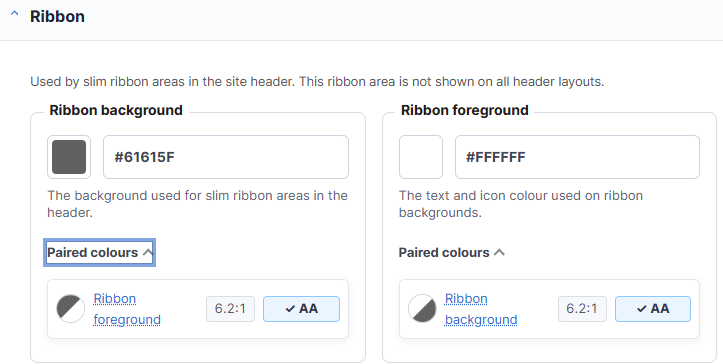
Fig. 2 Paired colours window
Changes may have been made to enhance this feature since we last updated this page. See What’s new for the latest release information.
Last updated: 24 July 2026
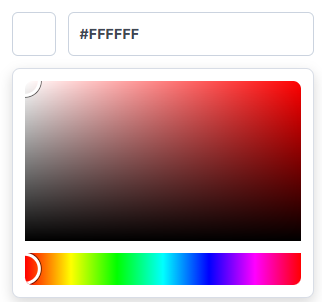
Fig. 1 Colour picker