
Site launch settings
Role: Site Administrator
Take control of your site launch. Learn how to configure site settings to make your website public and optionally indexed by search engines. By default, sites are restricted to signed-in users and are not indexable by search engines.
Related information
How to configure
Getting started
Sign in and navigate to the admin area (Fig. 1)
Image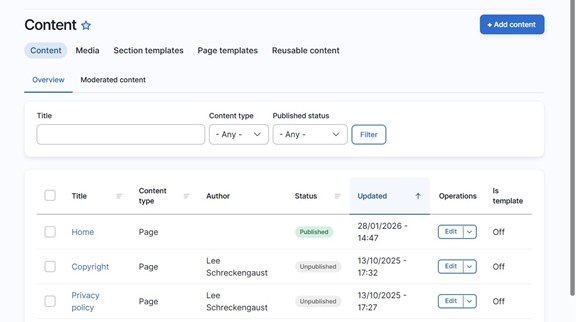 Fig. 1 Overview of administration area
Go to Settings tab (Fig. 2)
Image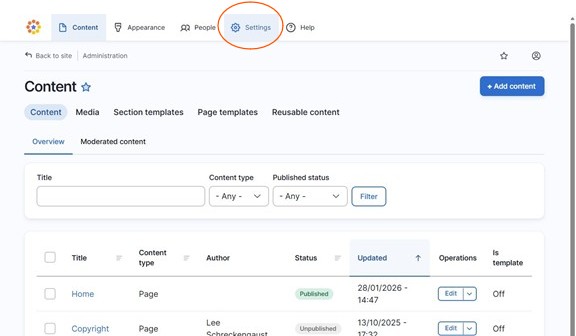 Fig. 2 Select the Settings tab
Select "Site launch" under System settings (Fig. 3)
Image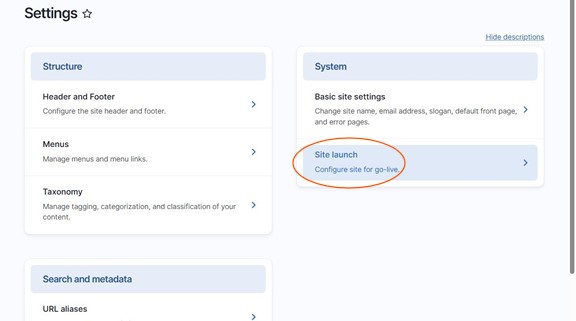 Fig. 3 Site launch option
Making a site public
- Toggle Make my site live to enable public access (Fig. 4)
Image
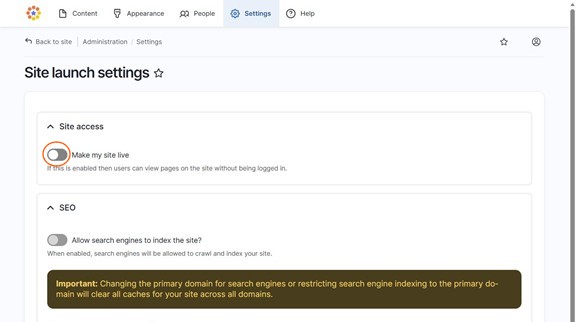
Fig. 4 Toggle button for Make my site live
Optionally, toggle on Allow search engines to index the site? if you want the site to appear in search results (Fig. 5)
Image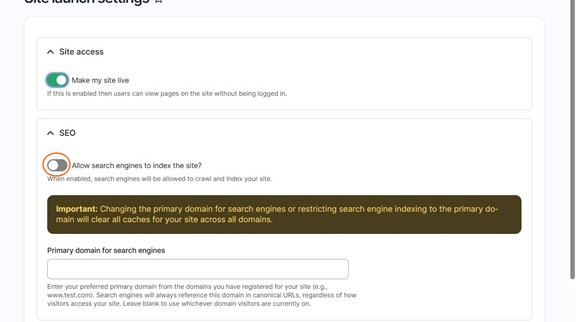 Fig. 5 Toggle button to allow search engines to index the website
Click Save configuration to apply your changes (Fig. 6)
Image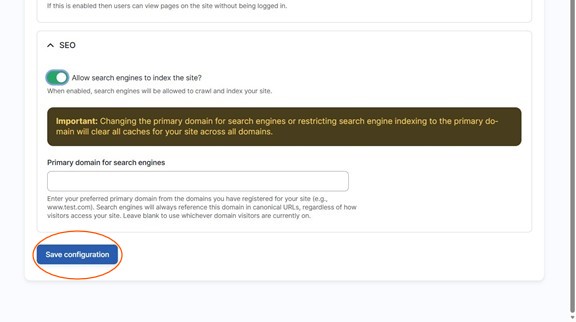 Fig. 6 Save configuration button
Changes may have been made to enhance this feature since we last updated this page. See What’s new for the latest release information.
Last updated: 23 April 2026