
Primary Domains
Role: Site Administrator
This page provides information on Primary Domains and how to configure them with Custom Domains after the Fresco Service Team confirm the domain has been successfully associated with your site if desired.
Related information
Getting Started
The Primary Domain is your website's public-facing address. Fresco supports setting a Custom Domain as your site's Primary Domain where desired. Once a custom domain has been associated with your site by the Fresco Service team and set as your Primary Domain, search engines such as Google will index your site into search results based on relevant terms.
- For example, searching "Fresco Help" in Google's presents this website (frescohelp.site.ox.ac.uk) as a top result.
Not all site's need a Custom Domain. You can keep the Platform Domain (prefix.site.ox.ac.uk) as your site's Primary Domain should you wish. This is what is set by default and no further action is needed once making your site Live.
Configure a Primary Domain
To configure your site's Primary Domain:
- Navigate to Settings > Site launch
- Switch Allow search engines to index the site to On (Fig. 1)
- (Optional) Enter your custom domain into the Primary domain for search engines field (Fig. 1)
- Click Save configuration
Leaving this field blank will maintain the Platform domain (prefix.site.ox.ac.uk) as the Primary Domain.
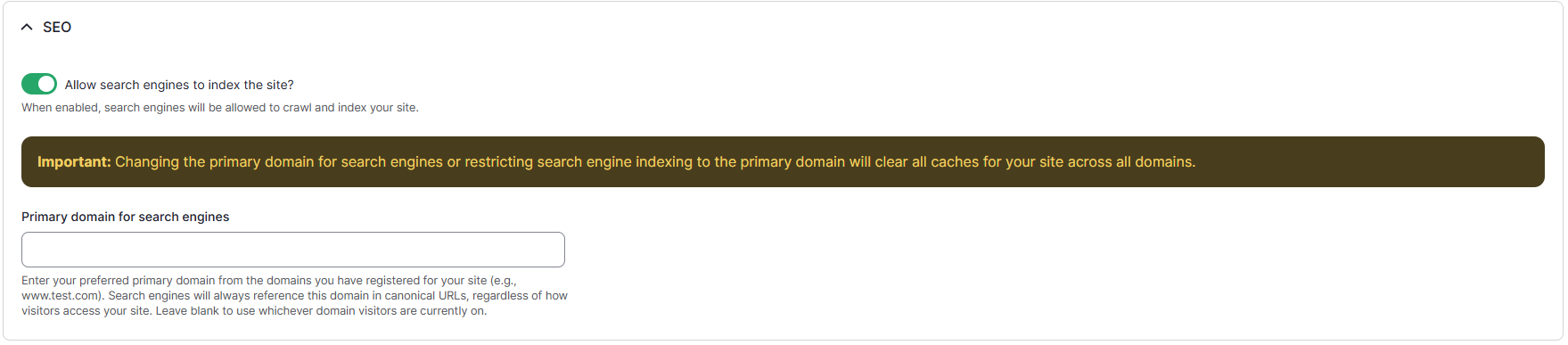
Fig. 1 - Example of SEO toggle and Primary domain for search engines field
Further Information
Entering your site's custom domain into the Primary domain for search engines field will indicates to search engines that this is the preferred version when similar or identical content is accessible through multiple URLs, regardless of how visitors access the site. This is referred to as a 'Canonical URL'.
Search engines independently determine when and how websites appear in search results. After enabling SEO (search engine optimisation) it may take some time for these changes to be reflected in search results.
If your site is not appearing as expected, there are a few things you can check:
- Ensure Allow search engines to index the site is enabled
- Ensure your Primary Domain is configured correctly
- Use clear and descriptive page titles that reflect the content of each page
- Include useful, relevant content containing terms people are likely to use when searching for your site
- Keep your site's content up to date
Changing your Primary Domain may also take some time to reflect in search results as search engines have to reindex your site and establish new associations with your new Primary Domain.
Please note: Fresco cannot control how quickly a search engine indexes your site, where your site appears in search results, or guarantee that it will appear for a particular search term.
Fresco site's are permitted up to two Custom Domain associations. Often, people opt to associate a 'www.' variant of their Custom Domain, though this is optional and dictated by preference.
For example, a site with the Platform Domain of prefix.site.ox.ac.uk may have:
- Custom domain #1: prefix.co.uk
- Custom domain #2: www.prefix.co.uk
Regardless of what Custom Domain(s) are configured for a site, only one can be set as the Primary Domain. As such, we advise to simply follow preference and set the domain you wish to be the 'most visible' as the Primary Domain.
(Custom) Secondary and Platform Domains will continue to direct traffic to your site via URL entry and links regardless of what is set for the Primary Domain.
Changes may have been made to enhance this feature since we last updated this page. See What’s new for the latest release information.
Last updated: 2 Oct 2026