
Hero Layouts
Role: All editing roles
The Hero Component has three different available layouts. The application of each layout is available based on the page type. This page details each layout and compatible page type.
Related information
Layouts
The Hero Component has three available Layouts:
- Stacked
- (Image above or below)
- 50/50
- (Image left or right)
- Text Only
You can change your current Hero Layout under the dedicated Layout tab via the Choose a layout: dropdown meu whilst editing your selected Hero (Fig. 1).
The compatibility of these layouts is unique to each Page Type. As is the Metadata they display (Author name, Event Date, Location etc.)
For further information on Page Types please review: Adding a page
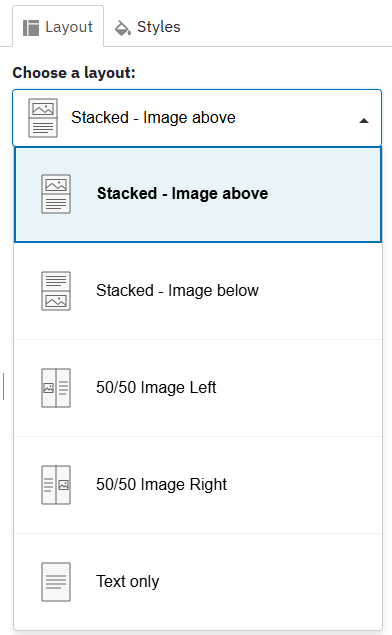
Fig. 1 - Choose a layout: dropdown menu
Layouts per Page Type
| Page Type | Hero Layout Available |
|---|---|
| Article | Stacked |
| Event | Stacked, 50/50, Text Only |
| Location | Stacked |
| Page | Stacked, 50/50, Text Only |
| Person | 50/50 (More to come) |
Changes may have been made to enhance this feature since we last updated this page. See What’s new for the latest release information.
Last updated: 9 November 2026